RAW Browser Engineering Journal

Inside the systems architecture, anti-fingerprinting engine, dual-engine runtime, and companion AI tooling of RAWβ€”a privacy-first browser built from scratch.

UI/UX

1. RAW β€” A Browser Rebuilt From Scratch

AB
Arnab Biswas
Solo Developer β€’ Systems & Privacy Architecture

Take a deep breathβ€”you are in a tracker-free zone now. RAW began from a very simple, relatable frustration: almost every mainstream browser on the market quietly treats you like the product on the shelf. Before a homepage has even finished loading, your typing rhythm, your GPU model, and even the ambient noise floor of your microphone get fingerprinted, packaged up, and handed over to an ad network (who probably knows your snack preferences better than you do). RAW is my personal answer to all that chaosβ€”a calming, user-first browser built on Electron, but completely re-engineered underneath with its own custom window management, an uncompromising privacy shield, an intelligent AI agent, and a friendly companion hanging out right on top. (Yes, there are real notes in my project repo titled I broke-internet.md and I_was_about_to_go_mental_hospital.md from the debugging days, so I suffered so you don't have to.)

When you first open it, RAW feels like coming home to a browser you already know and loveβ€”your tabs sit neatly up top, right alongside a clean address bar and the classic back, forward, and reload trio. The real magic reveals itself the moment you start playing around with it: you can effortlessly tear tabs off into brand-new windows, drag and reorder them with buttery-smooth animations, mute noisy tabs individually, duplicate them in a heartbeat, and even bring back twenty accidentally closed tabs in the exact order you lost them. Every single detailβ€”URL, title, favicon, loading state, and whether a tab is currently blasting musicβ€”is tracked per-tab in real time, meaning the UI never has to play a guessing game about what is happening beneath the surface.

Floating gently above your workspace is Tiyara, a 3D avatar companion who lives in her own transparent, always-on-top window and keeps you company while you browse. She lip-syncs to voice responses, dances along to whatever music you're playing, and gestures expressively while the AI agent is busy working on a task. Far from being a sticker slapped on top for show, she is wired directly into the exact same tool-calling pipeline that the AI agent uses to pilot the browser itself.

Grab a snack and scroll at your own pace: the rest of this page walks through every single system that makes RAW tickβ€”from the navigation layer, anti-fingerprinting engine, and page-friendly ad blocker to native DRM streaming, the built-in media downloader, the full-system VPN, on-device speech and translation, the 33-tool AI agent, Tiyara herself, and the handy utility suite tucked underneath. Every section includes its own screen recording so you can kick back and watch it all work in action, rather than just taking my word for it.

Tech Deep-Dive

2. Tabs, Windows & Navigation

AB
Arnab Biswas
Solo Developer β€’ Systems & Privacy Architecture

Tab management sounds like the most relaxing weekend project in the worldβ€”right up until you actually try building it from scratch. While Chrome has had well over a decade to polish its tabs, RAW's tab architecture had to be crafted from the ground up on top of Electron's WebContentsView, and it needed to go beyond standard expectations with full cross-window tab migration, per-tab audio isolation, and a closed-tab memory stack that actually respects chronology.

  • Mindful state tracking β€” Creating, closing, and hopping between tabs is orchestrated by a dedicated window manager that quietly watches every tab's URL, title, favicon, load progress, back/forward history, and whether it is currently making a racket.
  • Forgiving tab recovery β€” Accidentally closing a tab during a late-night research spiral isn't a tragedy here; the last 20 closed tabs are safely held on a per-window stack so hitting "reopen closed tab" brings them back in the exact order they left.
  • Seamless window hopping β€” You can pluck a tab right out of one window and drop it cozily into another, which under the hood means detaching and re-adopting a live WebContentsView mid-session without causing a single hiccup in whatever video is playing inside it.
  • Popup peace of mind β€” Annoying popups don't get to litter your screen with chaotic new windows; a smart window-open handler catches them at the door and tucks them neatly into contained tabs instead.
  • Secure internal routing & domain locks β€” Beyond everyday web surfing, RAW uses a custom internal app:// protocol to serve its own UI pages (like settings, tools, and history) in complete isolation from the open web, paired with an enterprise-grade domain lock that can strictly limit browsing to approved origins whenever you need guardrails.

Even printing and saving PDFs got the same loving attention to detail: a live print preview modal renders your page on the spot, crafts a crisp, lossless PDF using Chromium's native engine, or sends it straight to a physical printer without ever making you leave your cosy browser window.


Tech Deep-Dive

3. Inside the Privacy & Anti-Fingerprinting Engine

AB
Arnab Biswas
Solo Developer β€’ Systems & Privacy Architecture

If RAW has a protective older sibling energy, this engine is where it lives. Most "private" browsers block third-party cookies, pat themselves on the back, and call it a dayβ€”even though cookies are the least clever way trackers follow you around anymore. The sneakiest tracking happens by inspecting your actual hardware: how your specific GPU draws a hidden canvas, the microscopic quirks of your audio stack, and how many CPU threads your machine brags about having. RAW steps right in front of all of that so you can browse in peace.

  • Fail-closed partitioning β€” RAW flatly refuses to let any traffic wander through Electron's default session partition, routing everything instead through two strictly isolated, purpose-built partitions so accidental default-session leaks are impossible.
  • Canvas noise injection β€” Every time a script calls getImageData(), RAW stirs in a tiny, invisible pinch of mathematical noise so your canvas fingerprint looks different every session while keeping the visual page looking completely normal to your eyes.
  • WebGL disguise kit β€” Your GPU vendor strings, renderer names, and shader parameters are dynamically masked, preventing nosy scripts from recognizing your computer by its graphics card.
  • Audio fingerprint masking β€” Output from AudioContext receives the same imperceptible mathematical seasoning, shutting the door on acoustic device profiling without changing how your music sounds.
  • Hardware concurrency spoofing β€” I made RAW politely fib about navigator.hardwareConcurrency so trackers can't use your CPU thread count to pick you out of a crowd.
  • Session-seeded consistency β€” All of this protective noise is generated from a seed that stays steady for your current session (so web apps don't get confused and break mid-click) but refreshes between sessions so nobody can link today's visit to tomorrow's.

To make sure no sneaky script slips through a side door, RAW automatically attaches the Chrome DevTools Protocol debugger to every single tab, subframe, and background workerβ€”meaning even nested iframes that think nobody is watching get the exact same privacy rules applied. Plus, there is a completely separate sandbox partition set aside just for security testing, ensuring your experimental tinkering never touches your personal browsing life.


Tech Deep-Dive

4. Ad-Blocking That Doesn't Break Pages

AB
Arnab Biswas
Solo Developer β€’ Systems & Privacy Architecture

Modern ad blocking is basically a never-ending game of cat and mouse: the moment blockers get good, websites start setting up "honeypot" traps just to catch you and throw up a giant guilt-trip banner asking you to turn your blocker off. RAW's ad-blocking layer was designed to outsmart the traps quietly so you can just read your article in peace.

  • Heavy-duty multi-list filtering β€” A high-speed filtering engine comes pre-loaded with EasyList, EasyPrivacy, and uBlock-style filter lists working together, so if one list misses an annoying banner, another catches it.
  • Instant per-domain whitelisting β€” When you want to support a creator or site you genuinely trust, you can exempt their domain with a click and have it sync instantly across every rendering surface with zero awkward delay.
  • Polite stealth probe evasion β€” Instead of slamming the door in the face of known anti-adblock honeypot domains (which tips off the website), RAW intercepts them and hands back a harmless, invisible transparent pixel via its internal protocolβ€”leaving the trap completely satisfied while your page stays unbroken and ad-free.
  • FadBlock for video sanity β€” For those stubborn YouTube ads that try to sneak past traditional filters, FadBlock steps in to fast-forward the ad playback and click the skip button the millisecond it materializes, saving you from hearing about another productivity app you'll never download.

Tech Deep-Dive

5. Native DRM & Streaming Acceleration

AB
Arnab Biswas
Solo Developer β€’ Systems & Privacy Architecture

Here is a dirty little secret of indie browser development: out-of-the-box Electron Chromium builds don't have the licensing handshakes to speak Widevine or FairPlay like mainstream browsers do. Usually, that means the moment you try to unwind with Netflix, Spotify, Hulu, or Prime Video, the site either refuses to play altogether or passive-aggressively serves you a blurry potato-quality stream from 2006.

RAW fixes this headache with a bit of clever engineering magic: the moment it detects a protected streaming service, a lightweight native addon seamlessly mounts a real macOS WebKit view right on top of the Electron window for that specific tab. Because that layer is running genuine Safari-grade DRM under the hood, you get full hardware-accelerated Widevine and FairPlay decryption effortlessly. Even better, session cookies sync both ways between Electron's store and the native cookie store, and the overlay follows every window resize, move, and tab switch so smoothly that you'll never even notice a second rendering engine stepped in to save your movie night.


Tech Deep-Dive

6. XDown β€” The Built-In Media Downloader

AB
Arnab Biswas
Solo Developer β€’ Systems & Privacy Architecture

You've probably been thereβ€”trying to save a video for an offline flight and ending up on a sketchy "Free Video Downloader" website covered inseventeen fake green download buttons. To save you from that fate, RAW includes XDown, its own built-in media extraction engine that hums along quietly in a dedicated background process (complete with its own bundled ffmpeg and yt-dlp binaries) so your browsing never slows down and you never have to install extra command-line tools.

  • One-click stream grabber β€” Just click once on a tab playing media and XDown automatically spots the active stream and hands it over to the extraction engineβ€”no more hunting through network tabs or copy-pasting URLs.
  • Resilient HLS chunk wrangling β€” Segmented HLS streams are cared for by a dedicated session manager that tracks every piece, politely retries any segment that stumbles, and stitches the final video together seamlessly.
  • Clean in-memory caching β€” Streams flow through a speedy in-memory LRU cache rather than cluttering your hard drive with half-baked temporary scratch files.
  • Built-in clip studio β€” Want just a 30-second snippet or only the audio track? A friendly clip extractor UI lets you trim exact timestamps, choose your resolution, or pull pure audio before the file even lands in your downloads folder.

Tech Deep-Dive

7. The Full-System VPN & Privacy Network

AB
Arnab Biswas
Solo Developer β€’ Systems & Privacy Architecture

When other browsers brag about a "built-in VPN," they usually mean a glorified browser proxy that leaves the rest of your computer out in the cold. RAW goes all the way with a true VPN layer powered by the VLESS + REALITY protocol over Xray Core, which cleverly disguises your VPN handshake as everyday TLS web traffic so deep packet inspection can't tell the difference. Everything runs locally on your machine and can protect either just your browser or your entire operating system at the flip of a switch.

  • Batteries included β€” Native multi-architecture binaries for both the proxy core and tunneling layer come bundled right inside the app, complete with full routing tables and geo-data sets.
  • Share the umbrella with mobile tethering β€” Any phone on your Wi-Fi can hop into your desktop's encrypted VPN tunnel just by scanning a QR codeβ€”zero tedious typing of server keys required.
  • No-nonsense kill switches β€” While the full-system VPN is on duty, IPv6 is automatically switched off system-wide and WebRTC is strictly locked down so your real local IP never slips out by accident.
  • Server-side ad blackholing β€” Known ad and tracker domains get dropped into a black hole right at the VPN layer, stopping junk packets before they even knock on your device's door.
  • Graceful network recovery β€” A multi-tier network interface detector makes sure that when you disconnect, your system's proxy settings are restored cleanly every single timeβ€”never leaving your Wi-Fi confused and pointing at a closed tunnel.

Tech Deep-Dive

8. On-Device Speech, Audio & Translation

AB
Arnab Biswas
Solo Developer β€’ Systems & Privacy Architecture

Sending your voice recordings or private reading material to somebody else's cloud server just to transcribe or translate a sentence kind of ruins the whole "privacy-first browser" vibe. That's why RAW keeps speech, audio tuning, and translation right on your own hardware wherever possibleβ€”fast, offline, and between you and your Mac.

  • Whisper-quiet local speech-to-text β€” Voice transcription runs on a standalone Whisper engine with zero external dependencies, custom-tuned for Apple Silicon's Metal GPU (from M1 all the way through M4 chips) so it transcribes as fast as you can talk.
  • Warm, human text-to-speech β€” Instead of sounding like a 1990s GPS navigator, RAW uses a custom Kokoro-based neural synthesis engine paired with a dedicated English phonemizer for natural rhythm, warmth, and pronunciation.
  • Studio-grade 14-band parametric equalizer β€” Whether you're listening to lo-fi beats or a lecture, built-in presets (Bass+, Acoustic, Vocal, Electronic, Rock, and moreβ€”born alongside my hardware-tinkering experiments like EQ-C++/esp3q.ino) sculpt your system-wide audio, not just what's playing in a tab.
  • Zero-latency offline translation β€” Powered by Apple Intelligence's on-device neural engine, RAW translates entire web pages offline in real timeβ€”swapping out live DOM text (right down to tiny tooltips and ARIA accessibility labels) and even intercepting JSON API responses mid-flight so dynamic content arrives already speaking your language.

Tech Deep-Dive

9. The RAW-AI Agent & Its 33 Tools

AB
Arnab Biswas
Solo Developer β€’ Systems & Privacy Architecture

Here is where RAW transforms from a cosy, well-armoured browser into an active co-pilot that can actually take the wheel when you're tired of clicking. Mapped out in detail across my architecture blueprints (RAW_AI_Architecture.svg, RAW_AI_Logic_Flow.mmd, and RAW_AI_Tools_Map.svg), the AI orchestrator smoothly routes your requests between local Ollama models and cloud modelsβ€”automatically falling back without a fuss if a cloud quota gets full, and streaming answers via ultra-fast NDJSON straight from local models whenever that's the quicker route.

Instead of just chatting from the sidelines, the agent has 33 hands-on tools organized into five practical toolkits:

  • Full browser automation β€” It can list, open, close, switch, navigate, duplicate, or restore tabs; click buttons and fill out forms by accessibility ID; scroll, search inside pages, pop open DevTools, or execute raw JavaScript directly inside the page context while you sip your tea.
  • Visual & multimodal perception β€” It can snap gated screenshots, render a whole page into a PDF stamped with numbered badges over every clickable element for pinpoint visual targeting, or run a reverse image search straight from a local file.
  • On-demand translation β€” Ask it to translate a highlighted paragraph or an entire foreign webpage and it handles it on the spot.
  • Interactive canvas & code validation β€” It can summon pre-built UI widgets (clocks, live weather cards, study flashcards, interactive quizzes), load structured skill runbooks, and pre-validate math, 3D graphs, molecular structures, or Desmos-style code against dedicated rendering engines before showing it to you so you never get a broken chart.
  • Audio, weather & 3D companion controls β€” It can flip your EQ audio presets, check the local forecast, or choreograph Tiyara's animations and poses right from the middle of your conversation.

For complete peace of mind, every multi-turn session is recorded with tamper-proof HMAC-SHA256 signed audit logs that track token usage and cost per turnβ€”and a multi-tier abort button lets you stop the agent (and any background sub-agents) mid-thought if you ever change your mind.


Demo

10. Tiyara β€” The 3D Companion

AB
Arnab Biswas
Solo Developer β€’ Systems & Privacy Architecture

Coding or researching at 2 AM is a lot less lonely when someone is cheering you on. Tiyara hangs out in her own frameless, transparent, always-on-top window that loyally follows and anchors itself to whichever browser window you're currently using. Underneath her friendly exterior is a hardware-accelerated Three.js WebGL stage complete with dynamic lighting, soft shadows, VRM bone rigs, cloth physics, and a custom inverse-kinematics solver that makes sure her arms and legs bend like a real person's instead of snapping like a wooden action figure.

  • A wardrobe for every mood β€” She comes with a full closet of VRM avatar outfits (Nerd, Anime, Kimono, Office, and Casual Outdoor) paired with a rich FBX animation libraryβ€”so she can do backflips when your code compiles, dance hip hop or rumba, tap her chin in deep thought, wave hello, or stroll around instead of being stuck in one boring idle loop.
  • True real-time lip sync β€” Her mouth shapes are driven live off the actual incoming audio waveβ€”whether she's speaking through local TTS or a live Gemini voice stream, nothing is pre-baked.
  • She actually hears your music β€” By tapping into a live hardware audio visualizer feed, Tiyara feels the real tempo and energy of whatever song is playing on your system and matches her dancing to the beat.
  • Choreographed by the AI β€” Because the AI agent can emit inline control tags mid-sentence, asking it to "have Tiyara switch into her kimono and do a celebratory wave" happens naturally right in the middle of your chat.

Demo

11. Gemini Live Voice Mode

AB
Arnab Biswas
Solo Developer β€’ Systems & Privacy Architecture

Sometimes your hands are busy holding a mug (or a cat) and you just want to talk things through out loud. Live Voice mode opens a direct, two-way WebSocket audio stream with Gemini's Live API, giving you natural, real-time spoken conversations without that awkward "record, wait, transcribe, wait, reply" walkie-talkie delay. It connects straight to a streamlined 13-tool registry curated specifically for snappy voice controlβ€”letting you command Tiyara, automate browser tabs, and kick off web research using nothing but your voice.

Because voice control is powerful, every single tool-execution request coming through that socket has to pass strict origin verification first, ensuring only the authorized browser view can trigger actions and keeping any outside interference locked out. And if you ask a deep research question that takes a minute to dig into, RAW spins up a background "deep thinker" agent to do the heavy reading quietly while you and the voice assistant keep chattingβ€”gently handing you the findings once they're ready instead of leaving you sitting in awkward silence.


Tech Deep-Dive

12. Turning Any Site Into a Native App

AB
Arnab Biswas
Solo Developer β€’ Systems & Privacy Architecture

Some websites deserve their own cosy home in your macOS Dock rather than getting buried between forty open tabs. RAW can wrap almost any website on the internet into a genuine, standalone macOS .app bundleβ€”not a glorified bookmark shortcut, but a real native application with its own window and Dock icon.

  • Automatic manifest harvesting β€” A smart manifest generator pulls the site's metadata, theme colours, and branding automatically so your new app looks like it was custom-built for macOS.
  • Crisp icon synthesis β€” Nobody wants a blurry 16Γ—16 pixel favicon stretched to the size of a coaster, so RAW upscales and synthesizes site icons into proper multi-resolution Apple .icns icon sets.
  • Clean, sandboxed titlebars β€” Your packaged apps launch in isolated, borderless windows complete with native macOS traffic-light buttons and discreet back, forward, and reload controls tucked right into the titlebar.
  • Centralized app registry β€” An internal registry keeps track of every app's bundle path, unique ID, and metadata, greeting you with a native macOS notification the second your freshly minted app is ready to launch.

Demo

13. Chat β€” The Conversational AI Workspace

AB
Arnab Biswas
Solo Developer β€’ Systems & Privacy Architecture

When you don't need the AI agent clicking around your tabs and you just want a quiet, distraction-free space to brainstorm or write code, Chat is your dedicated sanctuary. Built for deep multi-turn conversations with crisp markdown rendering and syntax-highlighted code blocks, it lets you hot-swap between Gemini, OpenRouter cloud models, or a 100% offline local Ollama model mid-conversation without ever losing the thread of what you were talking about.

Replies stream in smoothly token by token, and every single chat is saved locally on your machineβ€”so if you close the window to go touch grass and come back three days later, your conversation picks up right where you left off without you having to re-explain a thing.


Tech Deep-Dive

14. LocalDrive β€” Secure Local File Sharing

AB
Arnab Biswas
Solo Developer β€’ Systems & Privacy Architecture

Why is it that in 2026, sending a single photo from your phone to your laptop still tempts people into emailing it to themselves or uploading it to a cloud drive three continents away? LocalDrive puts an end to that madness by spinning up a featherweight local HTTP file server right on your machine, guarded by a cryptographically secure, short-lived token that only unlocks that specific transfer instead of leaving an open door on your network.

Connecting is effortless: just point your phone's camera at the QR code on screen and your devices link up directly over your local Wi-Fi. There are no accounts to log into, no third-party servers snooping on your files, and the access token politely expires on its own when you're done.


Tech Deep-Dive

15. VPNExtender β€” Mobile Tethering Cockpit

AB
Arnab Biswas
Solo Developer β€’ Systems & Privacy Architecture

VPNExtender is the friendly mission control panel for sharing your desktop's encrypted VPN tunnel with your phone, tablet, or any other device lounging on your Wi-Fi. It crafts fresh VPN configurations on the fly and displays them as a clean QR codeβ€”just scan it with your phone's camera and your mobile traffic is instantly tucked into the exact same protected tunnel as your computer, without typing a single cryptographic key by hand.

Under the hood, it remembers and reuses credentials for devices you've already trusted, sweeps away old peer configurations that aren't being used anymore, and carefully guards your host computer's routing table so sharing your connection never messes with your main machine's network stability.


Demo

16. VRMPoseEditor β€” Posing Tiyara

AB
Arnab Biswas
Solo Developer β€’ Systems & Privacy Architecture

Ever wanted to play animation director without learning a hundred Blender hotkeys? VRMPoseEditor is the visual studio where Tiyara's custom poses and expressions come to life. It gives you a full 3D viewport equipped with intuitive inverse-kinematics gizmosβ€”so when you grab a hand or a foot and drag it, the rest of her arm or leg follows along naturally instead of making you rotate every elbow and shoulder joint one by one.

It even runs live wind physics on her hair and outfit right inside the editor, so you can see how a pose flows in motion rather than designing something that looks like a statue. Once you're happy with a pose, its joint offsets save straight into the avatar libraryβ€”meaning the AI agent can immediately trigger your custom creation by name in your next chat.


Tech Deep-Dive

17. CTF Security Dashboard

AB
Arnab Biswas
Solo Developer β€’ Systems & Privacy Architecture

For the ethical hackers, bug hunters, and curious tinkerers in the room, the CTF Security Dashboard is a dedicated testing laboratory that runs strictly inside RAW's isolated sandbox partitionβ€”far away from your personal cookies and real browsing sessions. From one clean cockpit, you can flip individual security switchesβ€”including CORS enforcement, SSL behaviour, cookie rules, same-origin policy, custom headers, storage access, and eval permissionsβ€”to recreate specific vulnerable setups whenever you need them.

Even better, it teams up directly with the AI agent's specialized CTF toolkit, allowing the agent to open untrusted target URLs inside the blast-proof sandbox and test payloads against them with zero risk of anything spilling over into your everyday browser.


Tech Deep-Dive

18. AILogs Inspector

AB
Arnab Biswas
Solo Developer β€’ Systems & Privacy Architecture

An AI agent operating your browser should never be a mysterious black box. Every single AI session in RAW leaves behind a cryptographically signed audit trail, and AILogs Inspector is the clean, readable viewer built to let you explore it. You can trace complete reasoning chains step by step, see the exact sequence of tools the agent called, and check token usage metrics for every turnβ€”perfect both for squashing bugs and for simply verifying what your digital co-pilot did while you were away from the keyboard.

Because every log entry is sealed with an HMAC-SHA256 signature, nothing can be quietly edited or tampered with after the factβ€”giving you total confidence that what you're reading is the exact history of that session.


Tech Deep-Dive

19. AIFiles Manager

AB
Arnab Biswas
Solo Developer β€’ Systems & Privacy Architecture

Most Downloads folders eventually look like a digital junk drawer full of mystery PDFs and screenshots named Untitled (14).png. To keep your computer tidy, AIFiles Manager (mapped out in my RAW_AI_File_Logic.svg flowcharts) gives you a dedicated, organized home for everything the AI agent has created or fetched for youβ€”including task screenshots, rendered PDFs, and media grabbed via XDownβ€”all neatly linked back to the exact conversation that produced them.

Tech Deep-Dive

20. MorseCode

AB
Arnab Biswas
Solo Developer β€’ Systems & Privacy Architecture

Does a modern web browser strictly need a Morse code translator? Maybe notβ€”but life is much more fun with one. MorseCode is a playful text-to-Morse utility complete with both audio and visual playback, so you can type out a secret message and listen to it tap across your speakers or watch it blink on screenβ€”a cosy little reminder that software is allowed to have a soul.


Tech Deep-Dive

21. CrashLogs Diagnostics

AB
Arnab Biswas
Solo Developer β€’ Systems & Privacy Architecture

Even the most lovingly built software occasionally trips over its own shoelaces. When a tab or process does misbehave, CrashLogs Diagnostics gives you a calm, centralized, human-readable view of crash dumps and process telemetryβ€”saving you from digging through cryptic system folders so you can quickly see what happened or attach clean details to a bug report.


Tech Deep-Dive

22. Live Hot Engine Swap (Blink ⇄ WebKit)

AB
Arnab Biswas
Solo Developer β€’ Systems & Privacy Architecture

Desktop web browsers are almost universally religious monotheists when it comes to rendering engines. Chrome, Edge, and Brave run Google's Blink. Safari runs Apple's WebKit. Firefox runs Gecko. When you pick your daily driver, you are handcuffed to that single engine's strengths, rendering bugs, and power profile across every single tab you open.

While architecting RAW, I refused to accept that compromise. Blink is peerless for raw JavaScript performance, cutting-edge web standard adoption, Chrome extension compatibility, and developer tooling. But on macOS, Apple's native WebKit (WKWebView) possesses unique hardware capabilities: genuine 4K FairPlay DRM decryption for Apple TV+ and Netflix, direct Metal GPU compositor hooks, and remarkably low battery consumption on Apple Silicon.

Rather than making you juggle two separate browsers, RAW features a genuine Live Hot Engine Swap. Right-click any open tab, select "Swap to WebKit (Native)" or "Swap to Blink (Chromium)", and RAW dynamically morphs the underlying rendering engine in real timeβ€”preserving your video timestamp, form values, scroll coordinates, and active session cookies without missing a beat.

RAW // Dual Engine Runtime Pipeline
stateSync.js ⇄ DRMOverlay.mm
β”Œβ”€β”€β”€β”€β”€β”€β”€β”€β”€β”€β”€β”€β”€β”€β”€β”€β”€β”€β”€β”€β”€β”€β”€β”€β”€ Live Hot Engine Swap Pipeline ─────────────────────────┐
β”‚ [Tab Context Menu] β†’ Right Click β†’ "Swap to WebKit (Native)"                     β”‚
β”‚   β”œβ”€β”€ 1. stateSync.js: Extract { scroll, currentTime, volume, forms }            β”‚
β”‚   β”œβ”€β”€ 2. UI HUD: Trigger "Transforming Engine" Warp Sequence                     β”‚
β”‚   β”œβ”€β”€ 3. DRMOverlay.mm: Spawn [WKWebsiteDataStore nonPersistentDataStore] (ITP-Free)β”‚
β”‚   β”œβ”€β”€ 4. Atomic Injection: Inject Blink Cookie Jar β†’ OnComplete β†’ LoadURL()      β”‚
β”‚   β”œβ”€β”€ 5. 50ms Suppression Shield: Keep NSView hidden during UI animation          β”‚
β”‚   β”œβ”€β”€ 6. DOM Polling (25 attempts): Locate <video> β†’ Restore Timestamp & Play    β”‚
β”‚   └── 7. Clean Exit: Kill WebKit child process on return to Blink                β”‚
β””β”€β”€β”€β”€β”€β”€β”€β”€β”€β”€β”€β”€β”€β”€β”€β”€β”€β”€β”€β”€β”€β”€β”€β”€β”€β”€β”€β”€β”€β”€β”€β”€β”€β”€β”€β”€β”€β”€β”€β”€β”€β”€β”€β”€β”€β”€β”€β”€β”€β”€β”€β”€β”€β”€β”€β”€β”€β”€β”€β”€β”€β”€β”€β”€β”€β”€β”€β”€β”€β”€β”€β”€β”€β”€β”€β”€β”€β”€β”€β”€β”€β”˜
  • Sub-second state extraction (stateSync.js) β€” Before dismantling the active engine, RAW evaluates an asynchronous state extractor across the current tab. It calculates viewport offsets (scrollX, scrollY), probes HTML5 <video> elements down to the millisecond (currentTime, paused, volume, muted, playbackRate), and serializes all active <input>, <textarea>, and <select> inputs into an atomic snapshot payload.
  • Bypassing Apple's ITP and silent cookie loss β€” The most treacherous bug encountered during development was silent session drop. When switching from Blink to WebKit on YouTube or Google accounts, users were abruptly kicked out. Apple's default WKWebsiteDataStore enforces Intelligent Tracking Prevention (ITP), which silently discards cross-domain authentication cookies even when programmatically injected. RAW solved this by binding WKWebView to [WKWebsiteDataStore nonPersistentDataStore], completely disabling ITP enforcement while maintaining pristine session-level privacy.
  • Atomic C++ cookie-then-navigate synchronization β€” Introducing arbitrary delays between injecting cookies and triggering navigation caused fatal race conditions. RAW solved this by baking the cookie jar injection directly into Objective-C++ LoadURL and Reload within DRMOverlay.mm. Navigation only fires inside the InjectCookies completion handler, making it physically impossible for WebKit to request a page before cookies are written.
  • The 50ms native suppression shield & warp HUD β€” Swapping an Electron WebContentsView with an opaque macOS NSView overlay can cause violent visual flickering. RAW masks this transition with a sleek "Transforming Engine" HUD sequence. Under the hood, a rapid 50ms suppression loop keeps the native view hidden while it initializes, preventing the opaque window from flashing prematurely over the UI animation before smoothly revealing itself.
  • Dynamic DOM polling & frame-accurate resumption β€” Single-page applications (like YouTube or Netflix) do not instantiate their <video> player immediately upon HTML parse; it mounts asynchronously via client JavaScript. RAW's buildRestoreScript runs an intelligent polling loop (up to 25 attempts over 5 seconds). The moment the player attaches to the DOM, RAW synchronizes the exact timestamp and unpauses playback automatically.
  • Strict child process hygiene & audio isolation β€” When hot-swapping back to Blink (or closing a tab), RAW forcefully terminates the native WebKit helper process (drmManager.kill(tabId)). This reclaims system RAM, prevents background audio leaks from ghosting in the OS, and fully releases Metal GPU allocations.
"True browser freedom shouldn't force you into running two separate applications side by side. It means giving a single tab the agility to morph its rendering engine at willβ€”harnessing Blink for unrestricted web standard power, and native WebKit for hardware-grade 4K streaming and all-day battery life."

Tech Deep-Dive

23. Lock Domain & Tab Containment

AB
Arnab Biswas
Solo Developer β€’ Systems & Privacy Architecture

The modern web is full of aggressive, hostile navigation traps. Whether you are navigating complex research portals, streaming video sites, forums, or download mirrors, a single innocent click can trigger an unwanted redirect chain, an aggressive frame-busting script, or a cluster of popups that hijack your tab away to an unfamiliar scam or tracker domain.

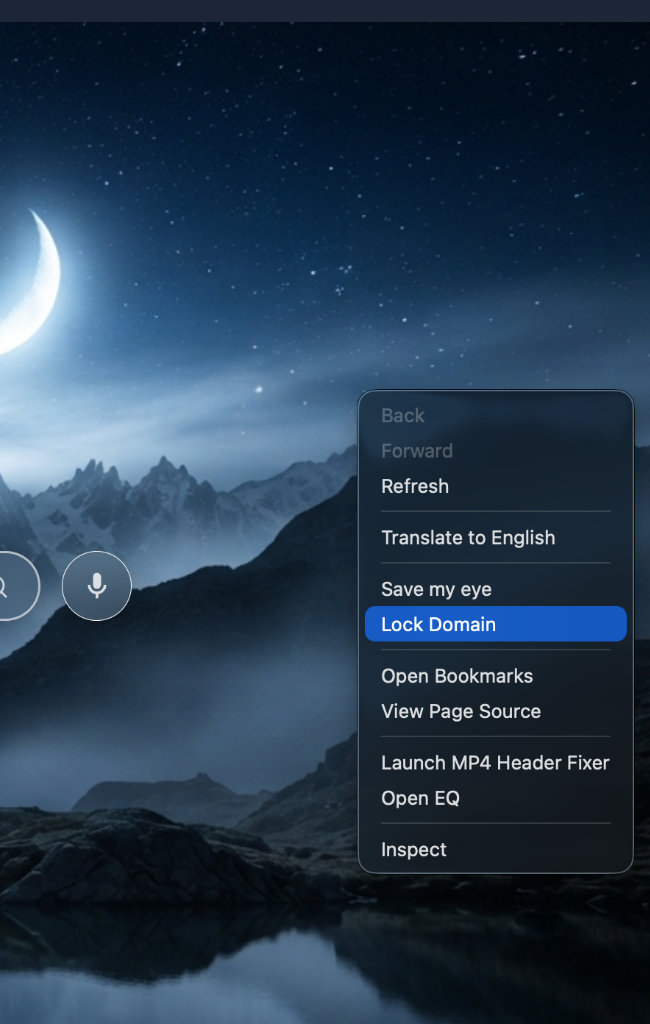
To eliminate this anxiety once and for all, RAW introduces Lock Domain. With a single right-click anywhere on a webpage, you can toggle "Lock Domain". The moment it is turned on, RAW establishes an airtight perimeter around that tabβ€”confining all navigation, frames, and popups strictly to the current root domain (e.g., youtube.com or github.com), while vaporizing rogue third-party redirect attempts before they can even touch the network.

Lock Domain Context Menu β€” RAW
RAW // Domain Lock Defense Matrix
domain_lock.js (tldts engine)
β”Œβ”€β”€β”€β”€β”€β”€β”€β”€β”€β”€β”€β”€β”€β”€β”€β”€β”€β”€β”€β”€β”€β”€β”€ Strict Domain Lock Defense Matrix ───────────────────────┐
β”‚ [User Action] β†’ Right-Click Webpage β†’ Toggle "Lock Domain" (Active Tab)         β”‚
β”‚   β”œβ”€β”€ 1. Root Domain Registration: Extracts eTLD+1 using tldts (e.g. site.com)  β”‚
β”‚   β”œβ”€β”€ 2. will-navigate: Traps link clicks & window.location β†’ Blocks Escape      β”‚
β”‚   β”œβ”€β”€ 3. will-redirect: Intercepts HTTP 301/302/307 server bounce chains         β”‚
β”‚   β”œβ”€β”€ 4. will-frame-navigate: Neutralizes top.location iframe frame-busting      β”‚
β”‚   β”œβ”€β”€ 5. guardWindowOpen: setWindowOpenHandler returns { action: 'deny' }        β”‚
β”‚   └── 6. inheritLock: Child windows automatically inherit parent domain lock    β”‚
β””β”€β”€β”€β”€β”€β”€β”€β”€β”€β”€β”€β”€β”€β”€β”€β”€β”€β”€β”€β”€β”€β”€β”€β”€β”€β”€β”€β”€β”€β”€β”€β”€β”€β”€β”€β”€β”€β”€β”€β”€β”€β”€β”€β”€β”€β”€β”€β”€β”€β”€β”€β”€β”€β”€β”€β”€β”€β”€β”€β”€β”€β”€β”€β”€β”€β”€β”€β”€β”€β”€β”€β”€β”€β”€β”€β”€β”€β”€β”€β”€β”€β”˜
  • Effective root domain resolution (tldts) β€” Rather than naively locking to an exact subdomain or raw host, RAW utilizes tldts-experimental to compute the true registered domain (eTLD+1). This means locking on music.youtube.com seamlessly permits you to navigate across www.youtube.com or m.youtube.com, while completely locking out unauthorized third-party destinations.
  • Real-time navigation interception (will-navigate) β€” The second a script or user link attempts to point the main frame outside of the locked domain (for example, clicking a deceptively masked link that attempts to escape to an external advertiser), RAW's navigation listener fires event.preventDefault() and terminates the attempt instantly.
  • Server-side redirect bouncer (will-redirect) β€” Many shady ad networks rely on HTTP 301, 302, or 307 redirect chains that pass you through multiple tracker domains before you realize what happened. RAW intercepts the redirect event at the protocol boundary, cutting the connection before the browser can even begin rendering the foreign domain.
  • Iframe & frame-busting neutralization (will-frame-navigate) β€” Malicious third-party iframes often execute top.location = ... or frame-busting scripts designed to hijack the entire browser window. RAW monitors will-frame-navigate with an explicit event.isMainFrame audit, locking out any iframe that attempts to force an off-domain navigation on the primary stage.
  • Zero-popup policy via guardWindowOpen β€” Unsolicited popups and click-under windows are completely suffocated. By intercepting Chromium's setWindowOpenHandler, any window.open() call or <a target="_blank"> targeting an external domain is rejected with { action: 'deny' }β€”so unwanted tabs never spawn into existence.
  • Automatic child lock inheritance (inheritLock) β€” When you click a valid link that opens a legitimate new tab or child window on the same domain, RAW's window manager passes the lock state directly into the new tab's WebContents. Your defensive sandbox remains unbroken without requiring you to toggle the menu again.
"Browsing should never feel like navigating a minefield of deceptive redirects and rogue popups. With Lock Domain, your tab becomes an impenetrable walled gardenβ€”you stay exactly where you intended to be, no matter what sneaky scripts try to throw at you."
© Covelly. All rights reserved.